🎵 Lyrica — Windows 11 Floating Lyrics
A lightweight native Windows desktop application built with Tauri 2, Rust, and React that displays real-time synchronized lyrics over Spotify and YouTube.
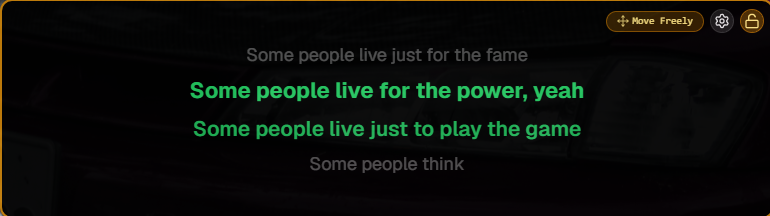
In-Depth Overview
🎵 Lyrica — Floating Synchronized Lyrics for Windows
Lyrica is a lightweight, open-source Windows desktop application that displays real-time synchronized lyrics in a transparent floating overlay. Designed for developers, designers, gamers, students, content creators, and music enthusiasts, Lyrica lets you enjoy your favorite songs while staying focused on your work—without switching windows or keeping dedicated media tabs open.
Built with Tauri 2, Rust, React 18, and TypeScript, Lyrica delivers native Windows performance with an ultra-light footprint, consuming approximately 10 MB of storage, less than 50 MB of RAM, and under 1% CPU usage while maintaining a smooth 60 FPS experience.
🌟 Why Lyrica?
Traditional lyric solutions require keeping Spotify visible, opening browser tabs for lyrics, or relying on browser extensions that interrupt your workflow and clutter your desktop. Lyrica eliminates these distractions by displaying lyrics directly on your screen through a transparent, always-on-top overlay.
The overlay is fully click-through by default, allowing all mouse clicks and keyboard interactions to pass directly to the applications underneath it. Whether you're coding in VS Code, designing in Figma, browsing the web, or gaming, Lyrica stays visible without getting in the way. When you need to reposition the overlay, simply hold the left mouse button for 250 milliseconds to unlock it, drag it anywhere on your screen, and after five seconds of inactivity it automatically returns to click-through mode.
🎧 Universal Media Detection
Lyrica integrates directly with Windows System Media Transport Controls (SMTC) to automatically detect the currently playing song, artist, album information, playback status, and album artwork. It works seamlessly with Spotify Desktop as well as YouTube and YouTube Music running in Google Chrome, Microsoft Edge, Mozilla Firefox, and Brave Browser. Intelligent title and artist sanitization removes unnecessary suffixes such as "- Topic," "VEVO," and "Official Video" to improve lyric matching accuracy.
🎵 High-Precision Lyric Synchronization
Lyrica uses a high-performance synchronization engine powered by requestAnimationFrame to provide smooth, frame-perfect lyric transitions. The engine automatically adapts to your monitor's refresh rate, whether it's 60Hz, 120Hz, 144Hz, or 240Hz. Advanced timeline smoothing eliminates jitter caused by media player position updates, ensuring lyrics remain stable and visually fluid. A built-in synchronization offset allows users to adjust lyric timing between -2000 ms and +2000 ms, with quick preset options for instant correction.
🖱️ Smart Floating Overlay
The floating lyrics overlay is designed to stay completely out of your way. It remains fully transparent to mouse interactions while still being visible on screen. Holding the left mouse button for just 250 milliseconds temporarily unlocks the overlay, allowing you to move or resize it anywhere across single or multi-monitor setups. Five seconds after repositioning, the overlay automatically locks itself again, preventing accidental clicks during work or gameplay.
🔠 Responsive Typography
Lyrica automatically adjusts lyric font sizes based on the size of the overlay. As you resize the floating window, the text scales smoothly in real time to maintain readability and provide the best possible viewing experience regardless of window dimensions.
💾 Offline Lyric Cache
Lyrics are retrieved from the open-source LRCLIB database and stored locally using Rust's embedded sled database engine. Previously viewed songs load instantly from cache without requiring another network request, providing near-instant lyric loading and allowing cached lyrics to remain available even when offline.
🎨 Fully Customizable Appearance
Lyrica offers extensive customization options to match any desktop setup. Users can choose between Full Layout, Compact Layout, or Lyrics Only mode depending on their preference. The application includes Dark and Light themes, customizable glassmorphism effects, adjustable backdrop blur, border visibility, border radius, font size controls, active lyric colors, and a curated collection of modern fonts including Geist, Inter, JetBrains Mono, Outfit, Nunito, and Playfair Display.
⚡ Real-Time Settings Synchronization
Every customization updates instantly across all application windows using BroadcastChannel and Tauri IPC. Changes made inside the Settings window are reflected immediately on the floating overlay without requiring a restart, providing a seamless and responsive user experience.
📦 Lightweight Performance
Despite its rich feature set, Lyrica remains exceptionally lightweight. The installer is approximately 10 MB, memory usage stays below 50 MB during normal operation, and average CPU utilization remains under 1%, making it suitable for continuous background use without impacting system performance.
🖥️ System Requirements
Lyrica supports both Windows 10 and Windows 11 (64-bit) and is distributed as both a standalone .exe (NSIS Installer) and .msi a Windows installer package.
🛠️ Built With
Lyrica is built using Tauri 2, Rust, React 18, TypeScript, Tailwind CSS, Windows System Media Transport Controls (SMTC), the LRCLIB API, and the embedded sled database, combining native performance with a modern web-based user interface to deliver a fast, elegant, and highly customizable floating lyrics experience.
More Projects
PayFlow
PayFlow is a planning-first financial OS built with Next.js 16, Supabase, and TypeScript. Unlike traditional expense trackers that look backward at spent money, PayFlow operates forward on payday—using a deterministic waterfall calculation engine to automatically allocate incoming salary across upcoming bills, recurring obligations, and goal funds in under 30 seconds.
Matik - Activity Keeper
A Windows desktop app built with Electron + React + TypeScript that simulates user activity (subtle mouse movements & Alt-Tabs) to prevent tracker inactivity auto-pause.
Z-budgeting
Take full control of your finances with ZeroBudget, the simple and intuitive budgeting app